Let guests download, with a password
Guest downloads are off by default. Turn them on under Album → Sharing and anyone who can open the album can download all of it as a ZIP, or just a selection; add a download password and they’ll need that too.
A guest download only ever contains what the album shows: approved, not hidden, and voice messages only while both voice switches are on. It requires a paid plan, and it doesn’t stop anyone from saving a picture they’re looking at.
Off until you say otherwise
A new album lets guests look but gives them no download button. That’s intentional: handing out copies of every file is a decision the host should make on purpose, not by default.
Turning it on takes 1 toggle and applies to everyone who can open the album, right away. Turning it off works the same way, and a download a guest already started stops working.
- Turn guest downloads on. Under Album → Sharing, next to the album settings. Off is the default.
- Add a password if you want one. It gates downloading only. Opening the album is a separate album password.
- Tell guests it’s there. Nobody looks for a download they weren’t told about.
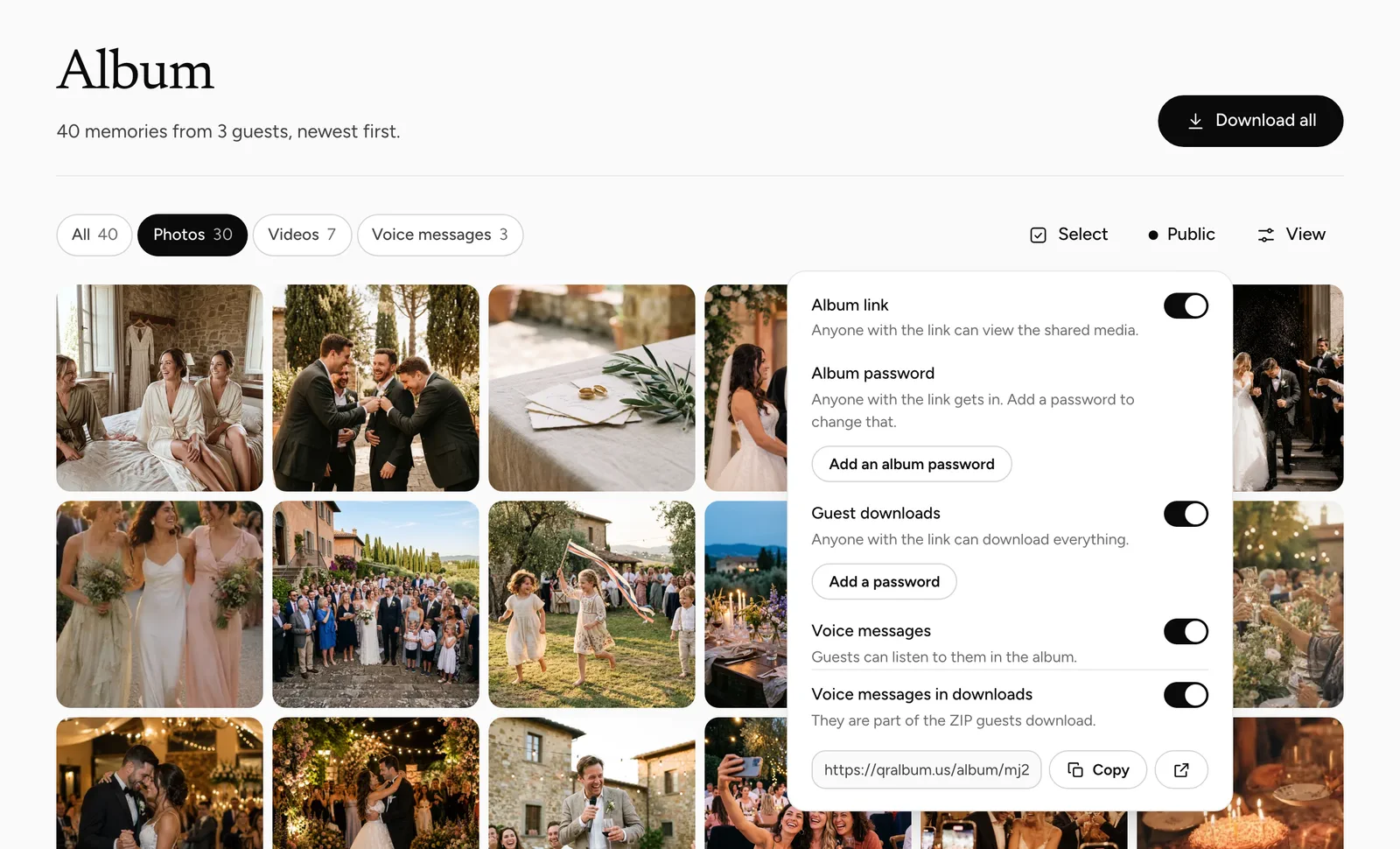
What a guest actually gets
Only what the album shows them: uploads that are approved, processed, and not hidden. Anything you removed from the shared album stays out of the guest download too — otherwise the download would hand back exactly what you just took out. Guests can take the whole album or pick up to 60 items.
Your own export isn’t affected by any of this. You always keep everything.
| Contains | Your export | Guest ZIP |
|---|---|---|
| Approved contributions | Yes | Yes |
| Items you hid | Yes | No |
| Items awaiting review | No | No |
| Voice messages | Yes | Only while both voice switches are on |
The guest ZIP is a subset of yours, never the other way around.
Voice notes are a separate decision
There are 2 switches for voice under Album → Sharing: “Voice messages” decides whether they show up in the album at all, and “Voice messages in downloads” whether guests can download them. If either one is off, they stay out of the guest ZIP. A recorded message is more personal than a photo, and it’s reasonable to let people listen without handing out copies.
Both are on by default, so if you want them out, you have to turn them off.
What the password does
It sits in front of downloading, and nothing else. Guests can still open the album and browse; the download password is what they need to take the files. It’s separate from the album password, which sits in front of viewing.
That combination is the useful middle ground: an open album for everyone, and the full files only for the people you gave the password to.
What turning downloads off can’t do
With guest downloads off, there’s no download button and no ZIP — but the album still shows every visible photo full size. Anyone who can open it can take a screenshot or save the picture they’re viewing, just like on any web page.
If a picture must not leave the album, hide it. If the album is meant for a small circle, put an album password in front of viewing instead of relying on the download switch.
It needs a paid plan
Original-quality downloads come with the paid plans, and the guest download is one of them. On the free plan, the switch can’t be turned on.
So this is a decision to make together with the plan, not after the party.
Say that it exists
A download nobody knows about doesn’t get used. Put it in the text you send the next morning: the album is open, and you can save the photos. That 1 line is what turns the switch into something people actually use.
If you set a password, send it in the same message, not separately. A second message is 1 too many.
Common questions
Are guest downloads on by default?
No. They’re off until you turn them on under Album → Sharing.
Do guests get the items I hid?
No. The guest download contains only what the album shows.
Are voice messages included?
Only if both “Voice messages” and “Voice messages in downloads” are on.
Is the download password the same as the album password?
No. One gates downloading, the other gates viewing, and you can use either or both.
Does this work on the free plan?
No. Original-quality downloads are part of the paid plans.
Does turning downloads off stop people from saving photos?
No. It removes the download button and ZIP; a picture on screen can still be saved or screenshotted.
Download everything
Your own complete export.
Is your album private?
Who can open the album in the first place.
Hide or delete uploads
Keeping a picture out of the album and the ZIP.
A guest album for a wedding
Let everyone take the day home with them.
A guest can’t download
Send us the album name and your plan. Between the switch, the password, and the plan, that covers it.